57 · Nsight Systems
Source: fanout.sh / inference-eng / 12-03 · ~7 min (text lesson)
NOTE
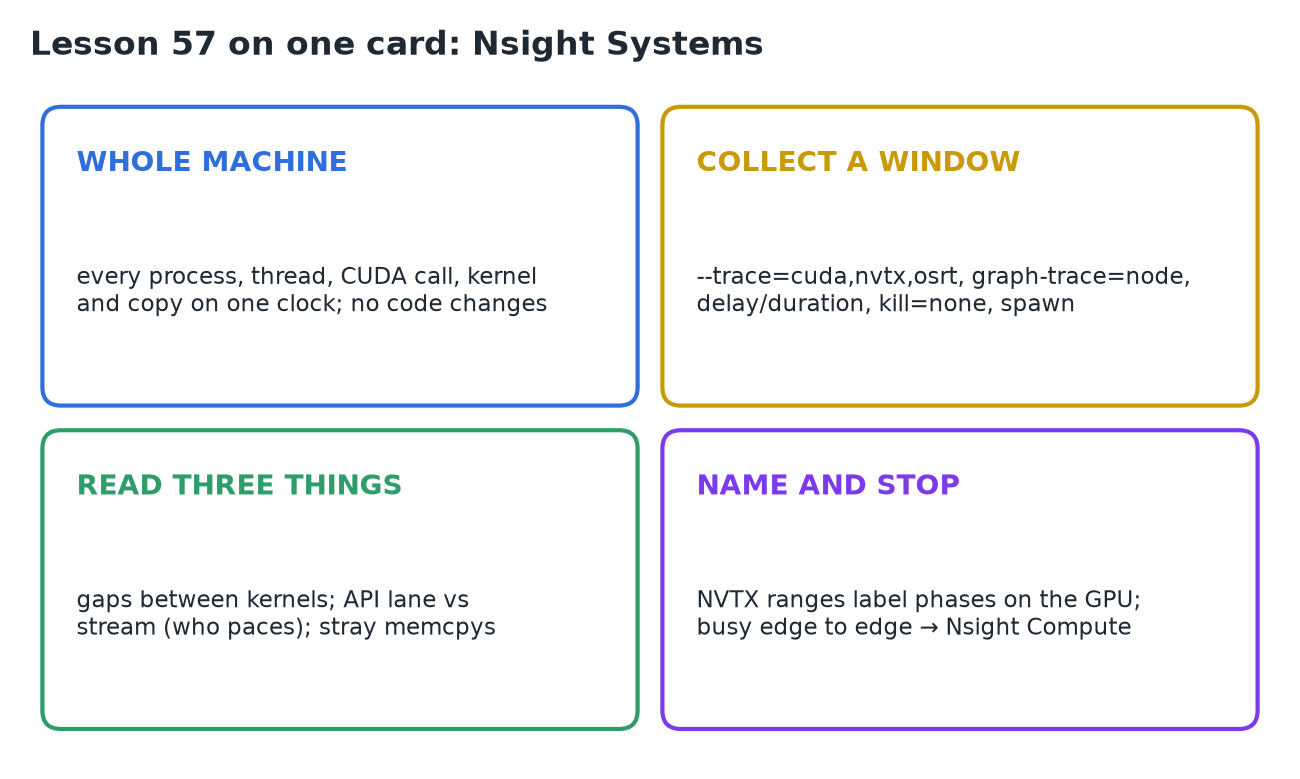
In-process tools can't say what the whole machine was doing around your process. Nsight Systems, NVIDIA's system-wide profiler, records a window of the machine's life as one timeline on one clock: every process, every thread, each thread's CUDA calls, the kernels and copies on the device, and the stretches where a thread blocked in the OS. It needs no code changes, so it works for any process, language or framework, including a serving stack split across processes. It answers which kernel or gap the time went to; it can't say what happened inside a kernel.
1. One timeline for the whole machine
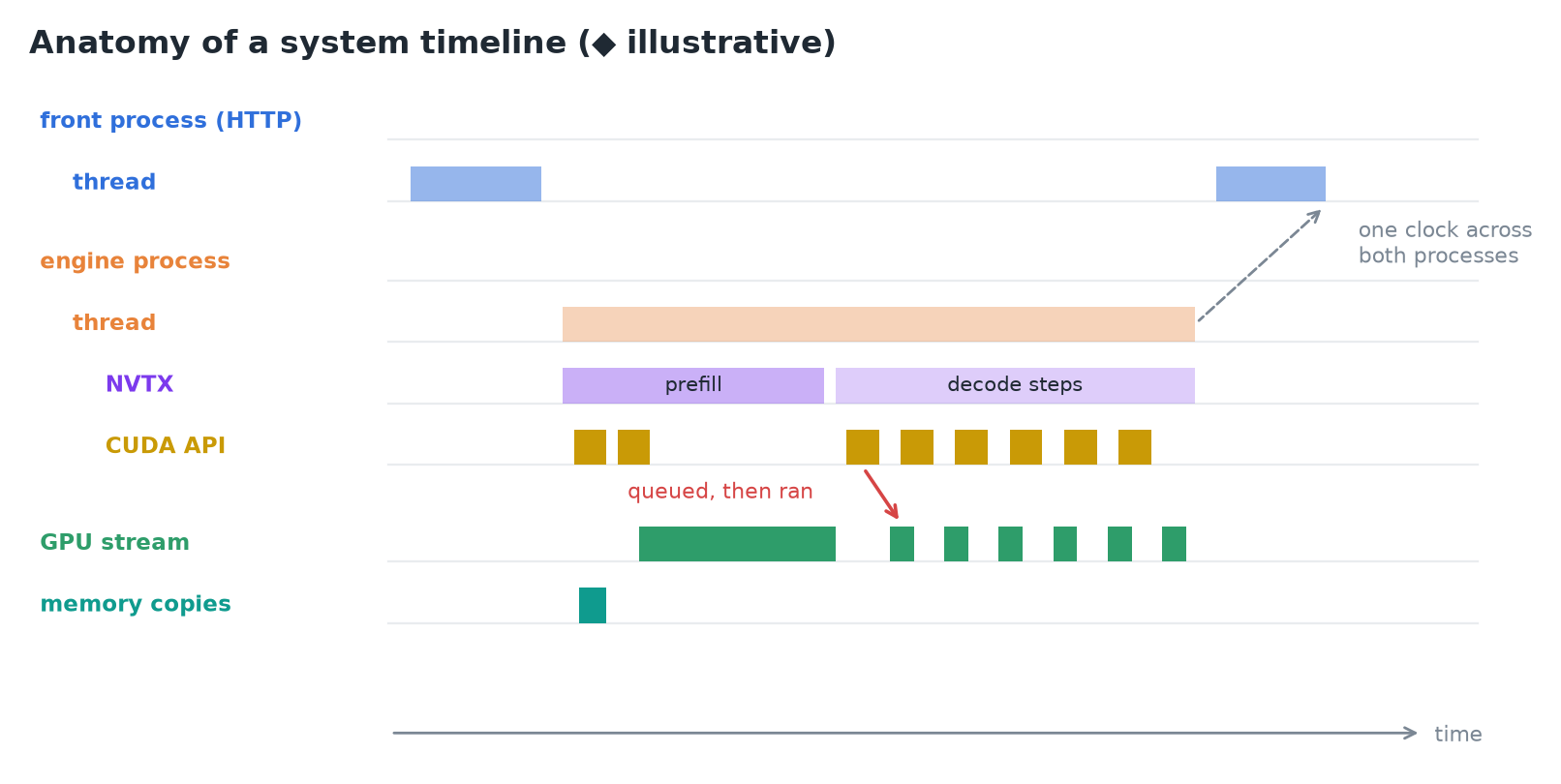 ◆ An illustrative timeline: threads and their calls above, the device's own order below.
- A serving stack isn't one process. vLLM, for example, has a front process that speaks HTTP and an engine core that steps the model. An in-process account ends at that seam; under Nsight Systems both halves land on one timeline, with everything else the box was doing.
- The rows follow the machine's hierarchy:
- each process is a block, each thread a row inside it;
- a thread that uses CUDA has a CUDA API row (boxes like
cudaLaunchKernel,cudaMemcpyAsync, spanning the wall time of each call); - at the bottom, the GPU: each CUDA context and its streams, where every box is a kernel or a memory operation, in the order the device ran them.
- A kernel appears twice: once as the API call that queued it, on the host thread, and once as the execution, on a stream, later. The device runs behind the host by design, and the timeline shows by how much.
2. Collecting a window on a serving process
nsys profile --trace=cuda,nvtx,osrt \
    --cuda-graph-trace=node \
    --delay=180 --duration=120 --kill=none \
    -e VLLM_WORKER_MULTIPROC_METHOD=spawn \
    -o decode-window \
    vllm serve NousResearch/Meta-Llama-3.1-8B \
      --max-model-len 2048
Representative command, not a capture.
| Flag | Why |
|---|---|
--trace=cuda,nvtx,osrt | CUDA API calls and device work; NVTX named ranges; OS runtime calls where threads block |
--cuda-graph-trace=node | opens replayed CUDA graphs into kernel rows (see below) |
--delay=180 --duration=120 | the declared window: skip startup and cold requests, record steady state |
--kill=none | by default the tool kills the process it launched when collection ends; a server should outlive its trace |
-e VLLM_WORKER_MULTIPROC_METHOD=spawn | vLLM starts its second process with fork by default, which an injection-based tool can't follow safely; spawn is safe |
- By default the tool also samples where every thread was executing. Worth keeping on a first pass;
--sample=none --cpuctxsw=noneis the lighter form once you know what you're after.
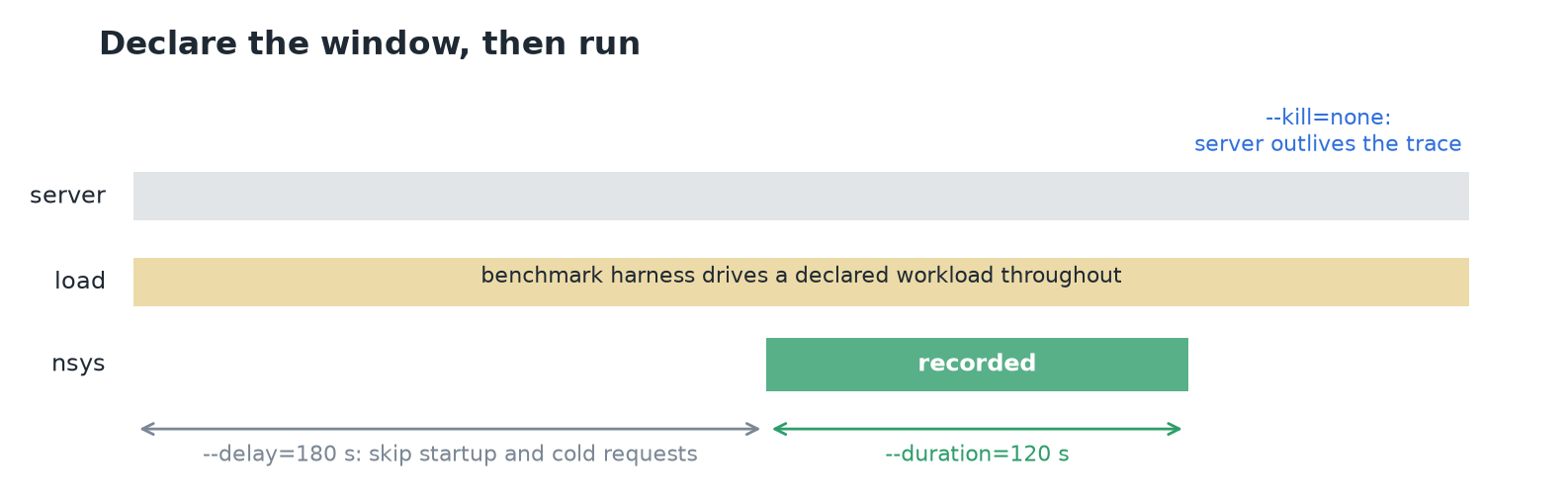 The window only shows something if a declared workload is running through it; an idle server gives a timeline of nothing.
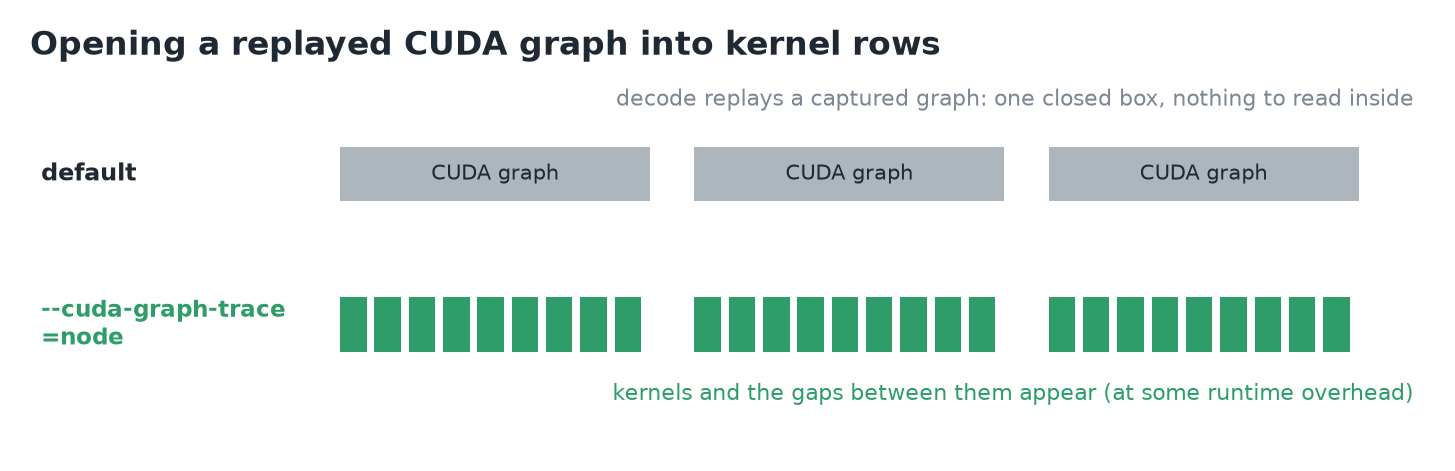 Without node tracing, a replayed decode graph is one closed box.
- vLLM replays decode as a captured CUDA graph. At the default granularity a graph draws as one item with nothing to read inside.
--cuda-graph-trace=nodeopens it into kernel rows, at what the guide warns may be significant runtime overhead. Without it, decode's kernels and the gaps between them never appear.
Reading the output:
decode-window.nsys-repopens in the GUI,nsys-ui.- Over SSH,
nsys stats decode-window.nsys-repprints ranked summaries. The three to read first are in the default set:cuda_gpu_kern_sum: kernels by device time;cuda_api_sum: API calls by wall time;nvtx_sum: your named ranges.
- To bracket a window by hand instead:
nsys launchstarts the target under the tool, thennsys start/nsys stopopen and close collection.
3. Three readings of a decode window
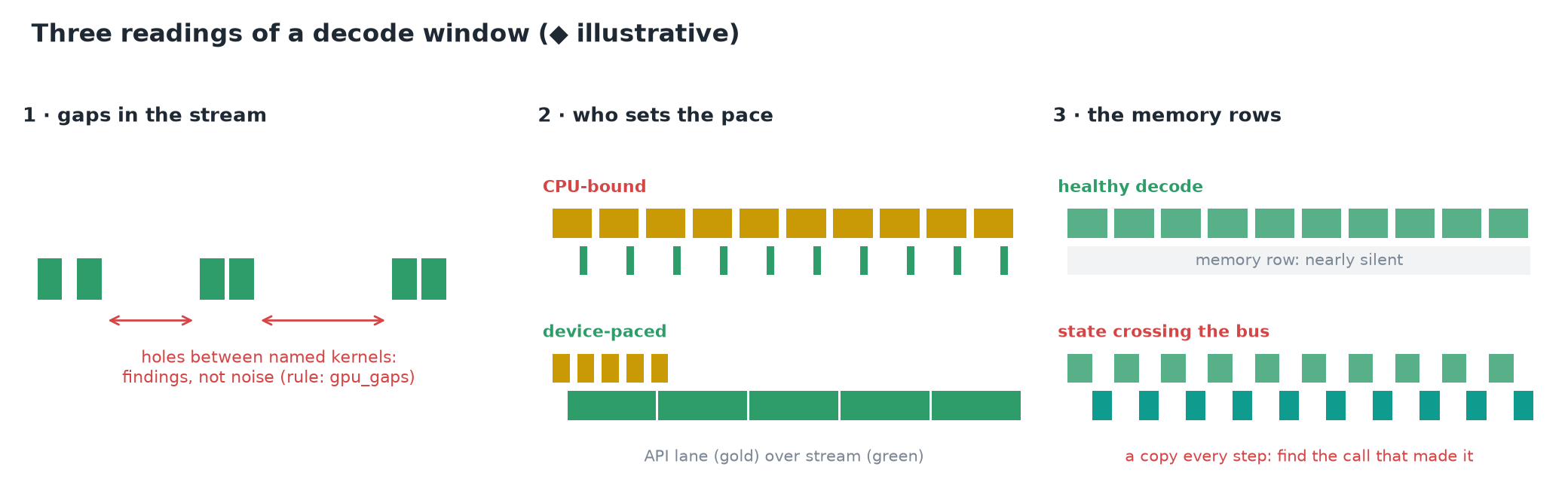 ◆ Illustrative shapes for each reading.
- Gaps in the stream. No zoom needed: the stream rows are either dense or full of holes. A mostly idle device while callers wait is not a kernel problem. Each hole sits between two named kernels, under an API lane that was either quiet (nothing was asked) or busy (asked, but the work didn't arrive). Gaps are findings, not noise; the CLI has an expert rule,
gpu_gaps, for this sweep. - Who sets the pace. Decode is many short kernels in a row.
- CPU-bound: an API lane packed with launch calls above a stream of slivers separated by air. The host sets the pace, one launch at a time.
- Device-paced: a stream running shoulder to shoulder, its boxes wider than the calls that queued them. The host is comfortably ahead.
- The memory rows. Steady decode should keep them nearly silent: the KV cache keeps state on the device, and a step only needs to move tokens, which are tiny. Wide or rhythmically repeating host↔device copies mean state crosses the bus every step, and the timeline shows which call on which thread made each one.
4. Naming your phases with NVTX
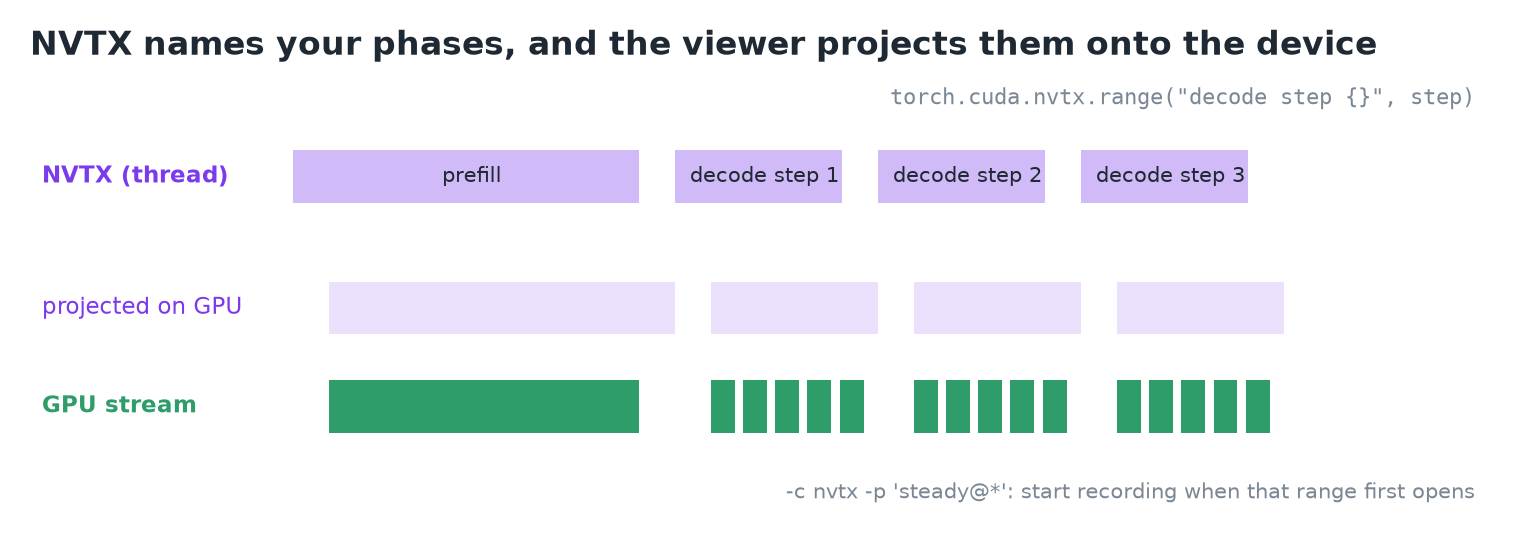 Ranges pushed on the thread are projected onto the GPU rows.
- Kernel names are the device's vocabulary; your phases (this request's prefill, that one's decode steps) don't exist on the trace until you name them.
- NVTX (NVIDIA Tools Extension): push a named range when a phase begins, pop it when it ends. PyTorch exposes it as a context manager:
with torch.inference_mode():
    if past is None:
        with torch.cuda.nvtx.range("prefill"):
            out = model(input_ids=seq, use_cache=True)
    else:
        with torch.cuda.nvtx.range("decode step {}", step):
            out = model(input_ids=seq[:, -1:],
past_key_values=past, use_cache=True)- Extra arguments fill the label through
msg.format(), so each decode step gets its own name. - The viewer projects each range onto the device rows: kernels and copies launched inside a range sit under that name on the GPU side, so per-phase questions are answered by reading.
- A range can arm the collection:
-c nvtx -p 'steady@*'holds recording until a range with that message first opens. torch.autograd.profiler.emit_nvtxstamps a range on every autograd op. It's built for matching training's backward to its forward; for a generation loop, a handful of hand-placed ranges says more.
5. The shape's limit
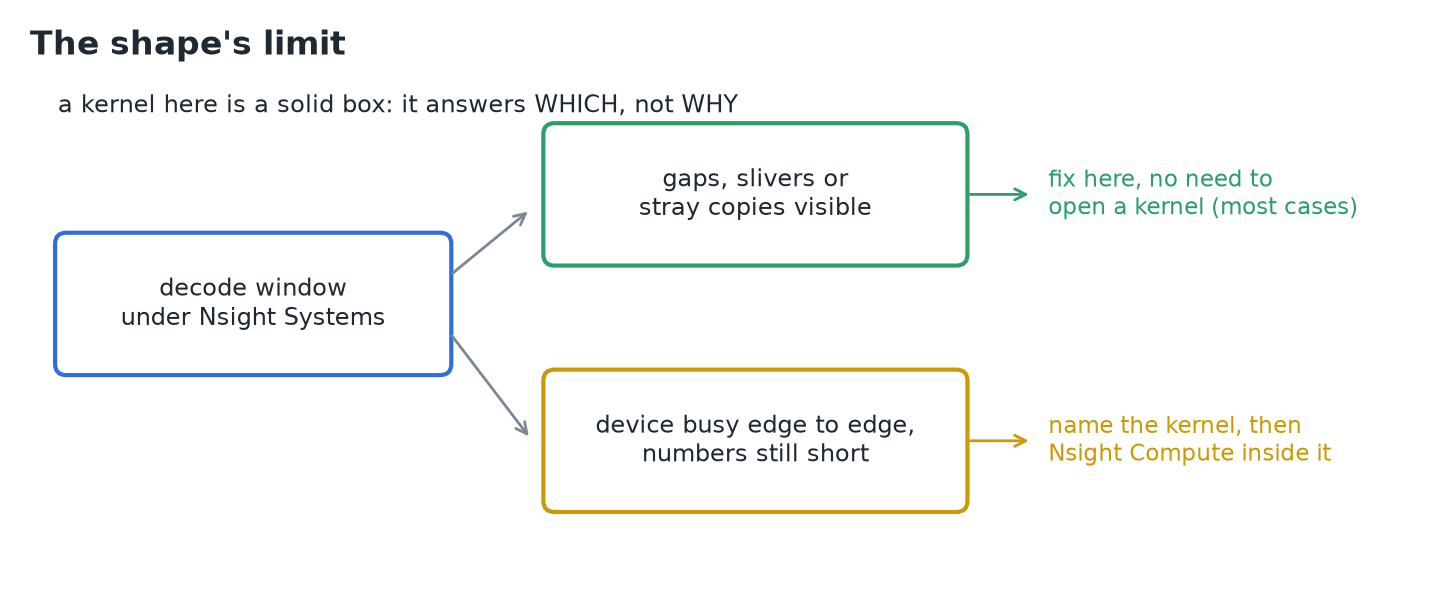 Most serving diagnoses end at this altitude.
- Everything here is a named box with a width on a lane. That's exactly enough to answer which: which kernel owns the device time, which gap the missing milliseconds fell into, which lane set the pace.
- It's also the limit: a kernel is a solid rectangle, and nothing about it says what the silicon spent its width on. That's Nsight Compute's job, aimed after Nsight Systems has named the target.
- Gaps never need that descent. An idle stretch, a launch-paced train of slivers, a copy that shouldn't exist: each is visible and fixable without opening a kernel.
- A window where the device is busy edge to edge but the numbers still come up short is what earns the kernel-level tool.
IMPORTANT
Nsight Systems shows the whole machine on one clock, without touching the code. Declare a steady window under real load, read the gaps, the pacing and the copies, and only go inside a kernel once the device is busy edge to edge.
6. Recap