30 · Read Engine Metrics & Request State
Source: fanout.sh / inference-eng / 06-04 · text lesson (no video), ~8 min
NOTE
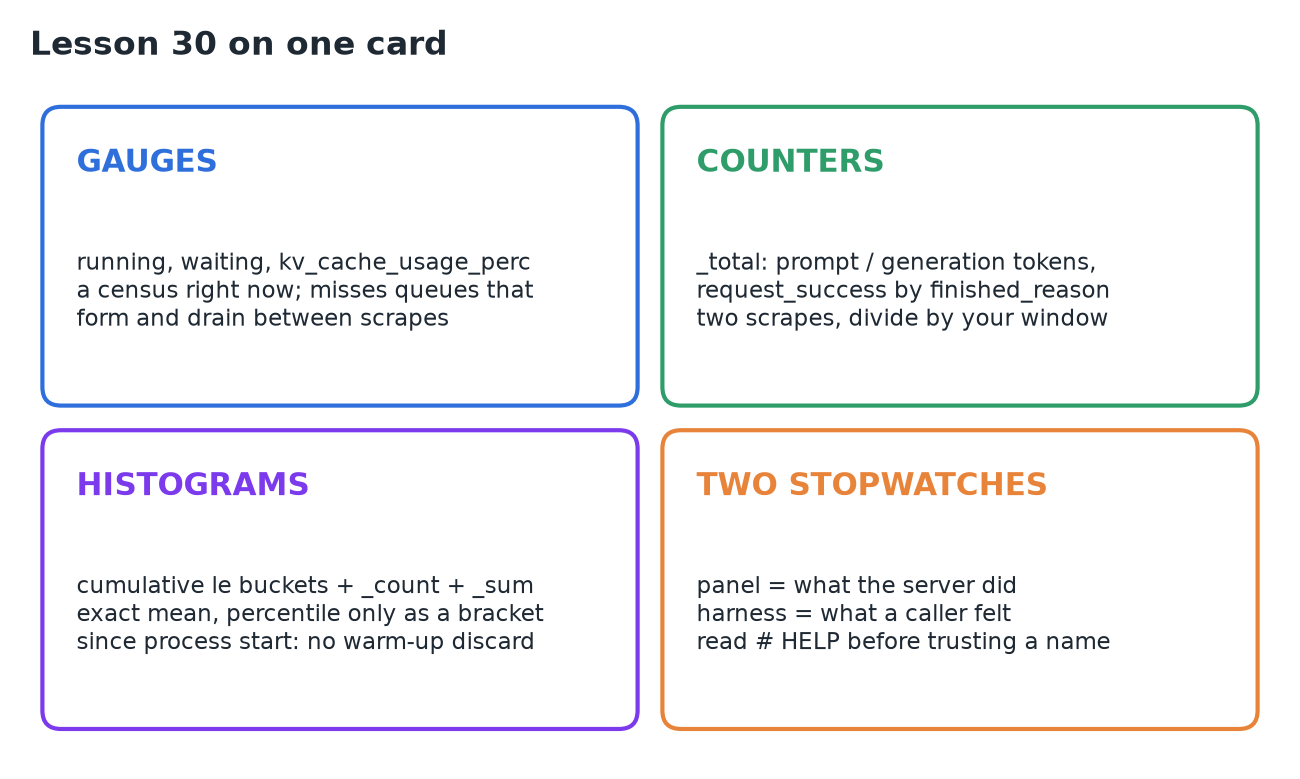
While the engine answers requests, it keeps its own account of them on /metrics, in the Prometheus text format. Three kinds of number: gauges (running, waiting, KV cache fill: a census right now), counters (_total: tokens and finished requests, meaningful only as a difference between two scrapes) and histograms (cumulative buckets plus _count and _sum: an exact mean, but percentiles only as a bracket). The panel says what the server did; a client harness says what a caller felt. Keep both: one request has more than one true duration.
1. The panel and its format
curl http://<server>/metrics returns plain text. Every line is a comment or a sample:
# HELP vllm:num_requests_running Number of requests in model execution batches.
# TYPE vllm:num_requests_running gauge
vllm:num_requests_running{engine="0",model_name="NousResearch/Meta-Llama-3.1-8B"} 0.0
# HELPcarries a sentence of documentation;# TYPEdeclares the kind of number; a sample is a name, labels in braces, and a value.- Two labels ride on every engine series,
engineandmodel_name, so one process serving two models keeps its numbers apart. Thevllm:prefix separates the engine's families from the Python runtime's and the web framework's, which publish on the same endpoint. - The lesson's snapshot ran to 526 lines under 60
# TYPEdeclarations. ◆ My vLLM 0.29 server: 623 lines, 86 declarations, 66 of themvllm:.
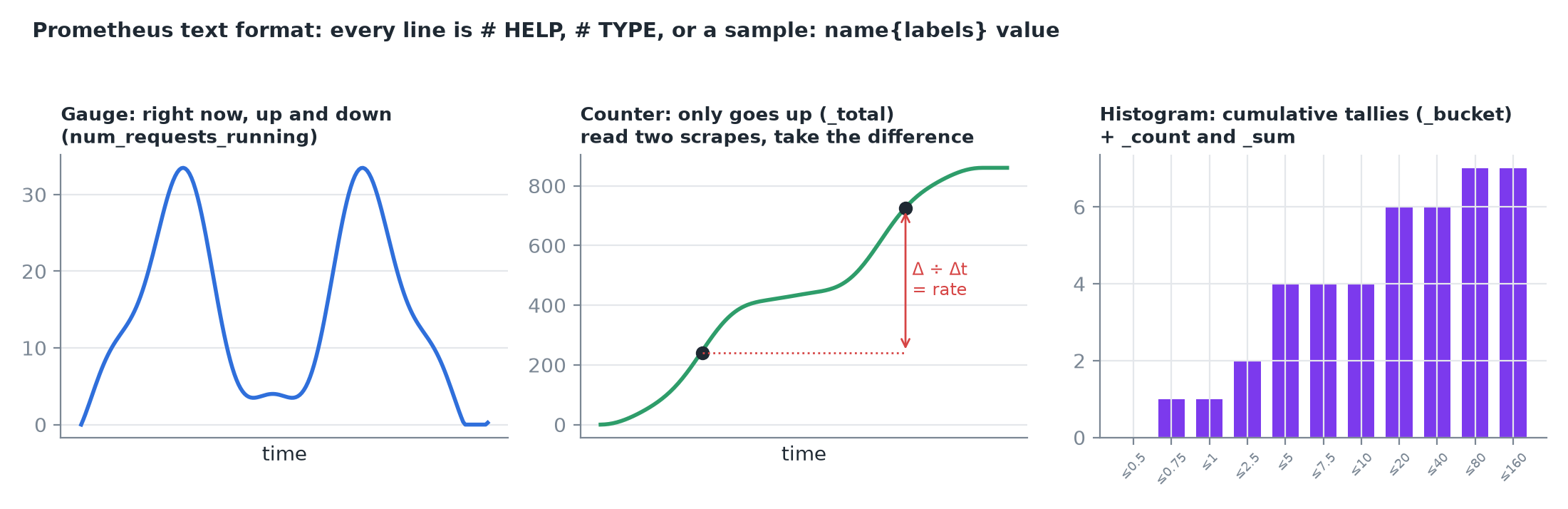 A gauge moves both ways and is read as "right now"; a counter only grows and is read as a difference; a histogram keeps cumulative tallies per threshold.
2. Gauges: running, waiting, cache fill
| Gauge | Documentation |
|---|---|
vllm:num_requests_running | "Number of requests in model execution batches" |
vllm:num_requests_waiting | "Number of requests waiting to be processed" |
vllm:kv_cache_usage_perc | "KV-cache usage. 1 means 100 percent usage" (a fraction, not a percent) |
- Under load (representative, an 80 GB card): 36 callers → running 30, waiting 6. The server reports the queue directly instead of you inferring it from first tokens arriving later and later. A running count above one means several requests share one model execution.
- KV usage is a fill level against the reservation the engine made at startup, not free device memory. The configuration itself appears as labels on an info gauge whose value is always 1.0 (that's how this format publishes facts that aren't numbers).
- With
--gpu-memory-utilizationat its 0.9 default, the representative H100 reserves 393,216 tokens:
The six queued callers add nothing: a request that hasn't run has no cache. (On a small CPU box the lesson's server reserved 16,384 tokens: 2 GiB at 131,072 bytes per token.)
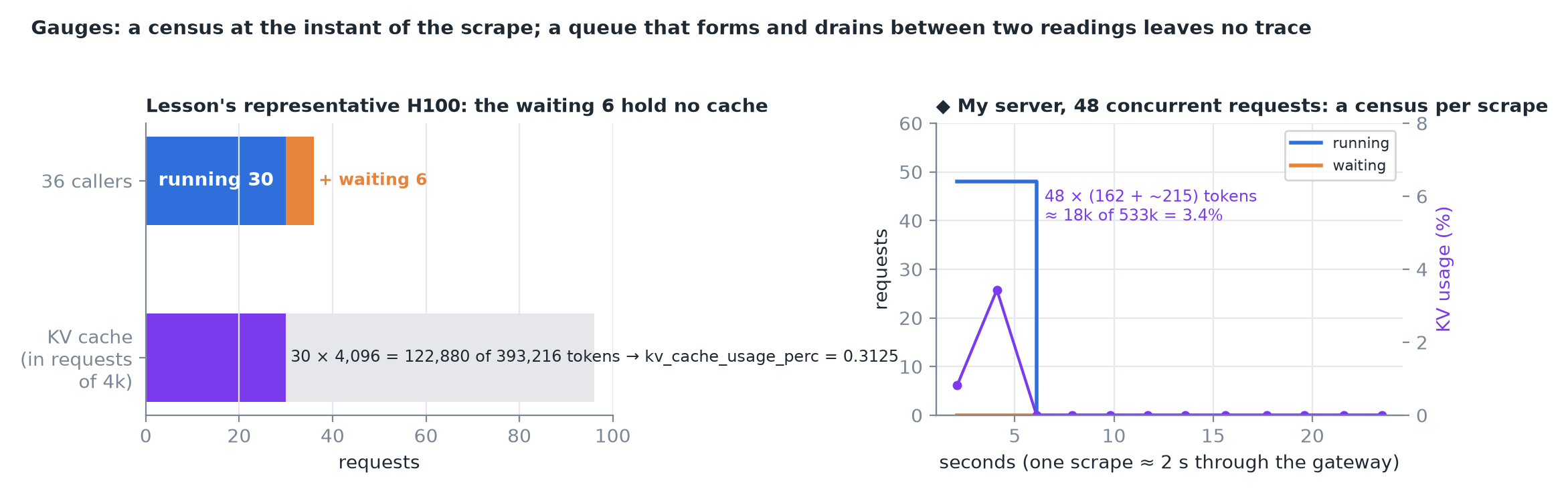 ◆ Right: my server with 48 concurrent requests. 48 × (162 prompt + ~215 generated) ≈ 18k tokens of a 533k-token reservation reads 3.4%, matching the gauge.
WARNING
A gauge is a census at the instant of the scrape. A queue that forms and drains between two readings leaves no trace, so a gauge reading 0 is not evidence that nobody waited.
3. Counters and their denominators
Counters only grow for the life of the process (_total suffix), so the difference between two readings is what matters.
| Counter | Counts |
|---|---|
vllm:prompt_tokens_total | Tokens read during prefill |
vllm:generation_tokens_total | Tokens produced during decode |
vllm:request_success_total{finished_reason=…} | Finished requests, one series per stop, length, abort |
- The server keeps both denominators of a throughput claim, prompt and generated, without being asked.
finished_reasonis something no caller-side measurement can see: in the lesson's capture all four requests endedlength(hitmax_tokens). It's the server-side half of failure accounting.- Lesson capture, three more requests between scrapes: prompt 24 → 72 (+48), generation 44 → 140 (+96). Divide by the seconds between scrapes and you get the throughput lines a benchmark prints.
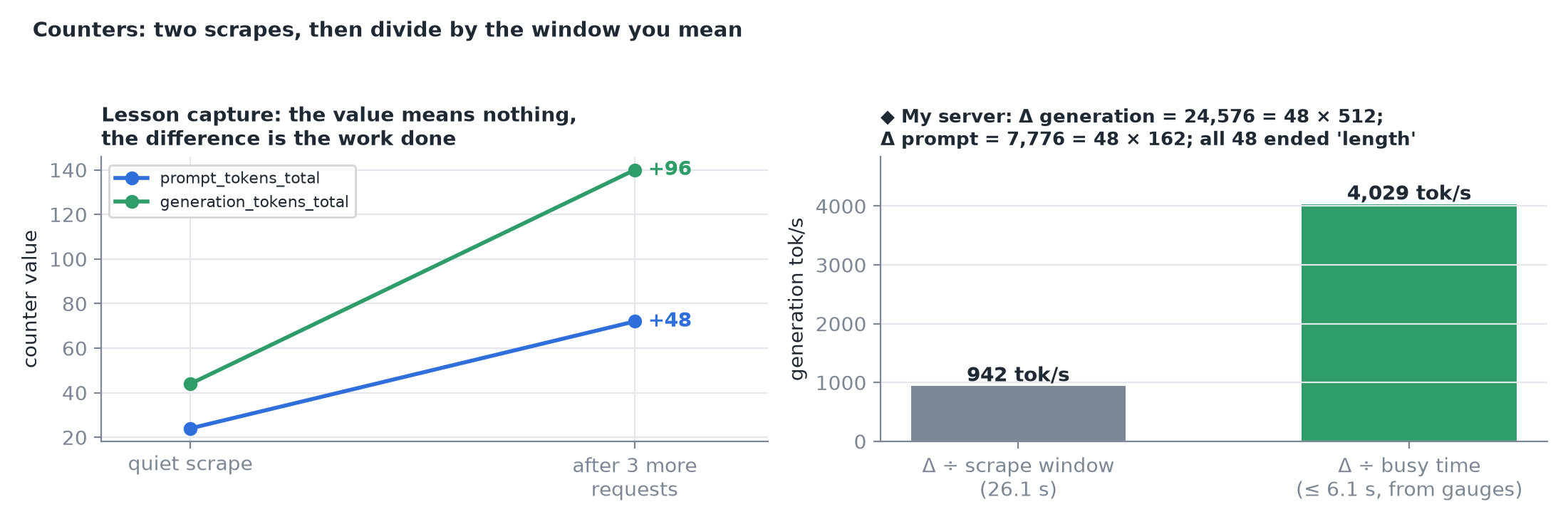 ◆ Right: on my server the deltas check exactly (24,576 = 48 × 512 generated; 7,776 = 48 × 162 prompt). The same delta gives 942 tok/s over the 26 s scrape window but over 4,000 tok/s over the 6 s the engine was busy: the window you divide by is part of the claim.
4. Histograms: tallies instead of stamps
vllm:time_to_first_token_seconds_bucket{le="0.75"} 1.0
vllm:time_to_first_token_seconds_bucket{le="2.5"}  2.0
vllm:time_to_first_token_seconds_bucket{le="5.0"}  4.0
vllm:time_to_first_token_seconds_bucket{le="20.0"} 6.0
vllm:time_to_first_token_seconds_bucket{le="80.0"} 7.0
vllm:time_to_first_token_seconds_bucket{le="+Inf"} 7.0
vllm:time_to_first_token_seconds_count 7.0
vllm:time_to_first_token_seconds_sum 91.898- Each
_bucketcounts observations at or under itsle; counts are cumulative, so+Infholds them all. _sum ÷ _countis the mean, exactly: 91.9 ÷ 7 = 13.1 s to first token on a CPU box streaming 16 GB of weights from ordinary memory every step.- The shape survives without a single stamp: one request under 0.75 s, three between 1 and 5 s, two between 10 and 20 s, one between 40 and 80 s.
- A percentile only comes back as a bracket: the median of 7 is observation 4, which sits in (2.5, 5.0] s for first token. For end-to-end latency the lesson's buckets put it in (60, 120] s, while
_sum ÷ _count= 501.2 ÷ 7 = 71.6 s is the one exact summary. - The thresholds are fixed in the engine's source (0.001, 0.005, 0.01 … 2560). Throwing stamps away is the trade that lets a server publish latency forever at fixed cost.
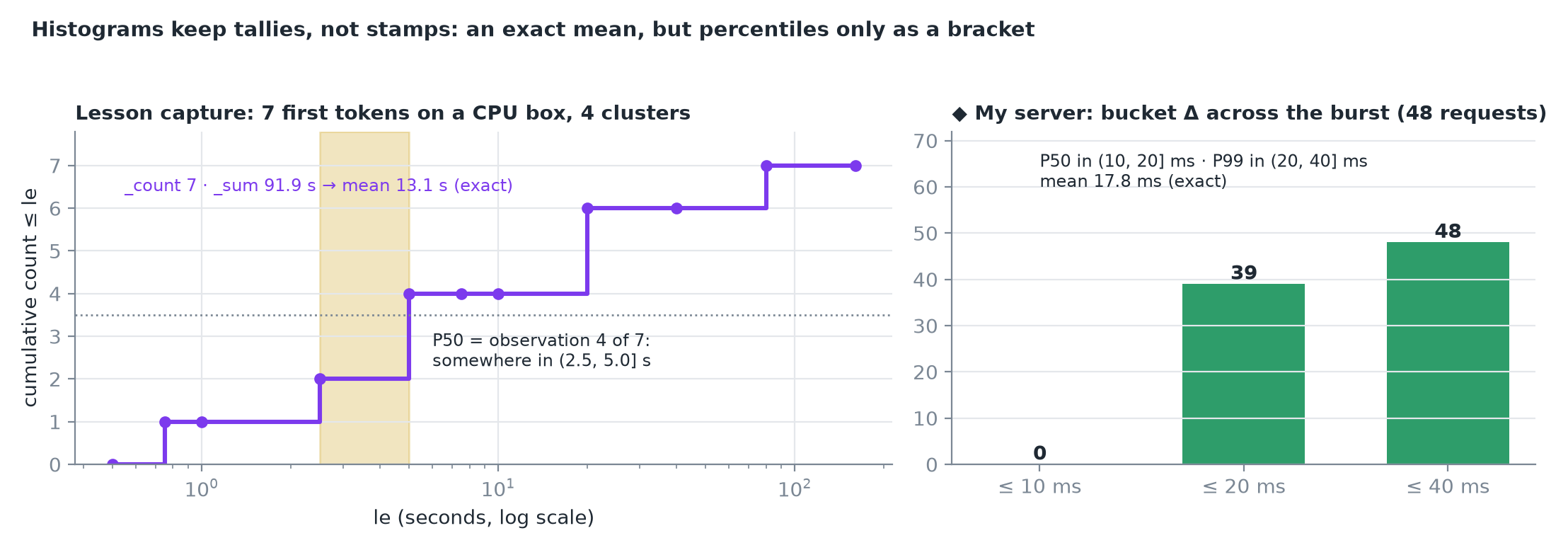 ◆ Right: subtracting my server's buckets before and after a 48-request burst recovers the window's own distribution: P50 in (10, 20] ms, P99 in (20, 40] ms, mean 17.8 ms.
CAUTION
Histograms are cumulative since process start, like counters. There is no warm-up discard: the first request of the day sits in _sum and every bucket forever. Two scrapes are the way back: subtract one snapshot's buckets from another's and the windowed distribution returns.
5. One request, seen from outside
The engine also narrates on a ten-second timer:
INFO … Engine 000: Avg prompt throughput: 0.6 tokens/s,
  Avg generation throughput: 0.1 tokens/s, Running: 1 reqs,
  Waiting: 0 reqs, GPU KV cache usage: 0.1%,
Prefix cache hit rate: 0.0%- Those heartbeats are the gauges in prose; they drop to DEBUG when every throughput field is zero, so an idle engine stays quiet.
- In one request's trail the prompt-throughput field is nonzero exactly once (the prefill pass, as a rate); then minutes of
Running: 1 reqswhile the reply streams back; thenEngineCore waiting for workand the web framework's access-log line.
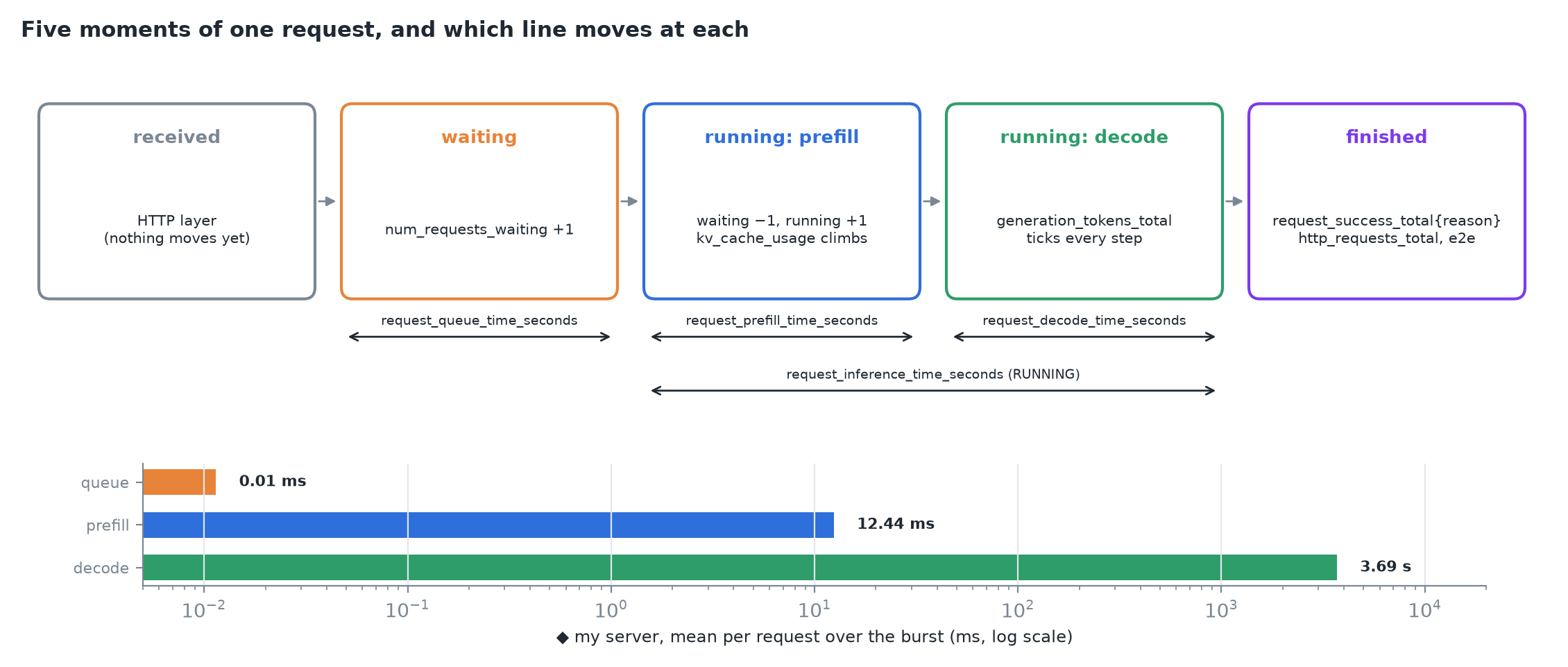 Received, waiting, running (prefill), running (decode), finished. The gauges are a census of the middle states; the phase histograms record what each state cost once the request ends. ◆ Bottom: my server's means over the burst: queue ≈ 0, prefill 12 ms, decode 3.7 s.
Nothing on the panel follows one request through the strip; the log does. And the panel names states without saying where they live: the transitions belong to something the log only names, EngineCore.
6. Two stopwatches on the same request
| Client harness | Engine panel | |
|---|---|---|
| Clock starts | Before the connection opens | When the request reaches the engine |
| Clock stops | When a chunk reaches your code | When the token leaves the engine core |
| Includes | Connection setup, transit both ways, client event loop | Engine time only |
| Population | The window you declared, requests you sent | Every request since start, from anyone; misses requests refused before the engine |
- The web framework keeps its own duration histogram: over the lesson's seven completions
http_request_duration_seconds_sum= 501.495 vs the engine's 501.214, so 0.28 s ÷ 7 ≈ 40 ms each of framing and delivery inside the server process. A loopback baseline measured the rest of the path at about 78 ms per request. - The quiet snapshot held 5 POSTs at the HTTP layer against 4 engine successes: a request refused before the engine is invisible to every
vllm:line.
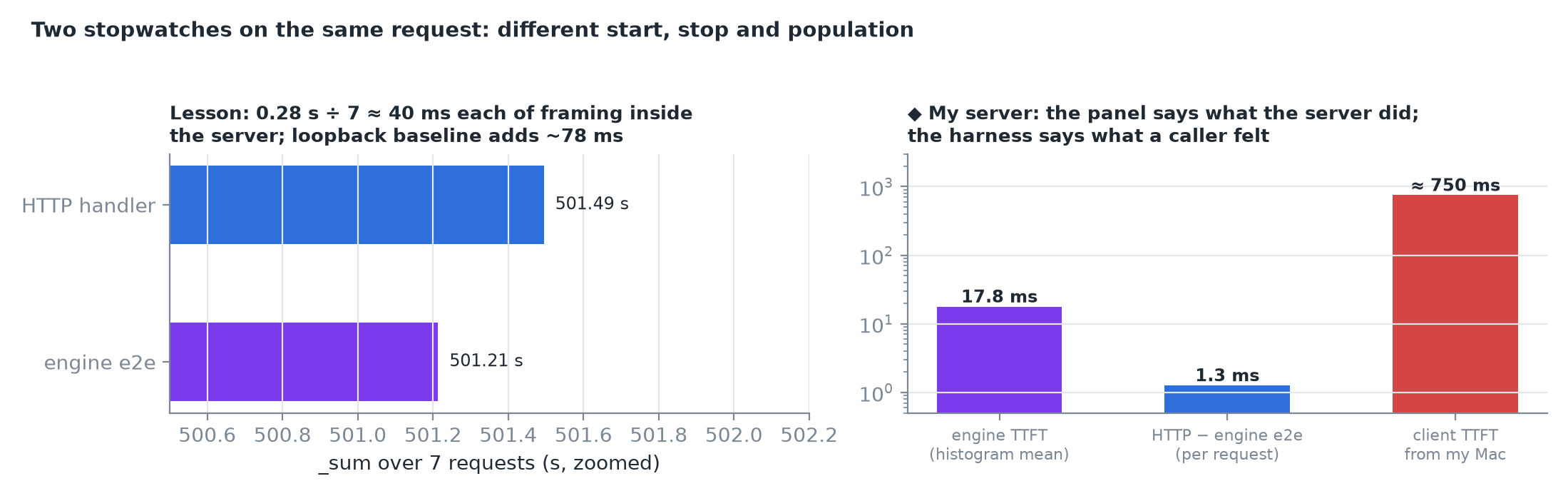 ◆ Right: on my server the engine reports an 18 ms first token and 1.3 ms of HTTP framing per request, while a client on my Mac sees about 750 ms. Neither is wrong; they answer different questions.
TIP
Read # HELP before trusting a name (versions rename and deprecate metrics), and take two scrapes before quoting a rate.
7. What each line answers
| What you want to know | Line to read | Kind |
|---|---|---|
| Is anything queued right now? | vllm:num_requests_waiting | gauge |
| How many requests share the current execution? | vllm:num_requests_running | gauge |
| How much of the cache is spoken for? | vllm:kv_cache_usage_perc | gauge |
| How much work has gone through? | vllm:prompt_tokens_total, vllm:generation_tokens_total | counters |
| How did requests end, and how many? | vllm:request_success_total by finished_reason | counter |
| How long did callers wait for a first token? | vllm:time_to_first_token_seconds | histogram |
| Where did a request's time go? | vllm:request_queue_time_seconds, …_prefill_…, …_decode_… | histograms |
8. Recap