42 · Tune GPU Memory & KV Capacity
Source: fanout.sh / inference-eng / 09-02 · ~9.5 min
NOTE
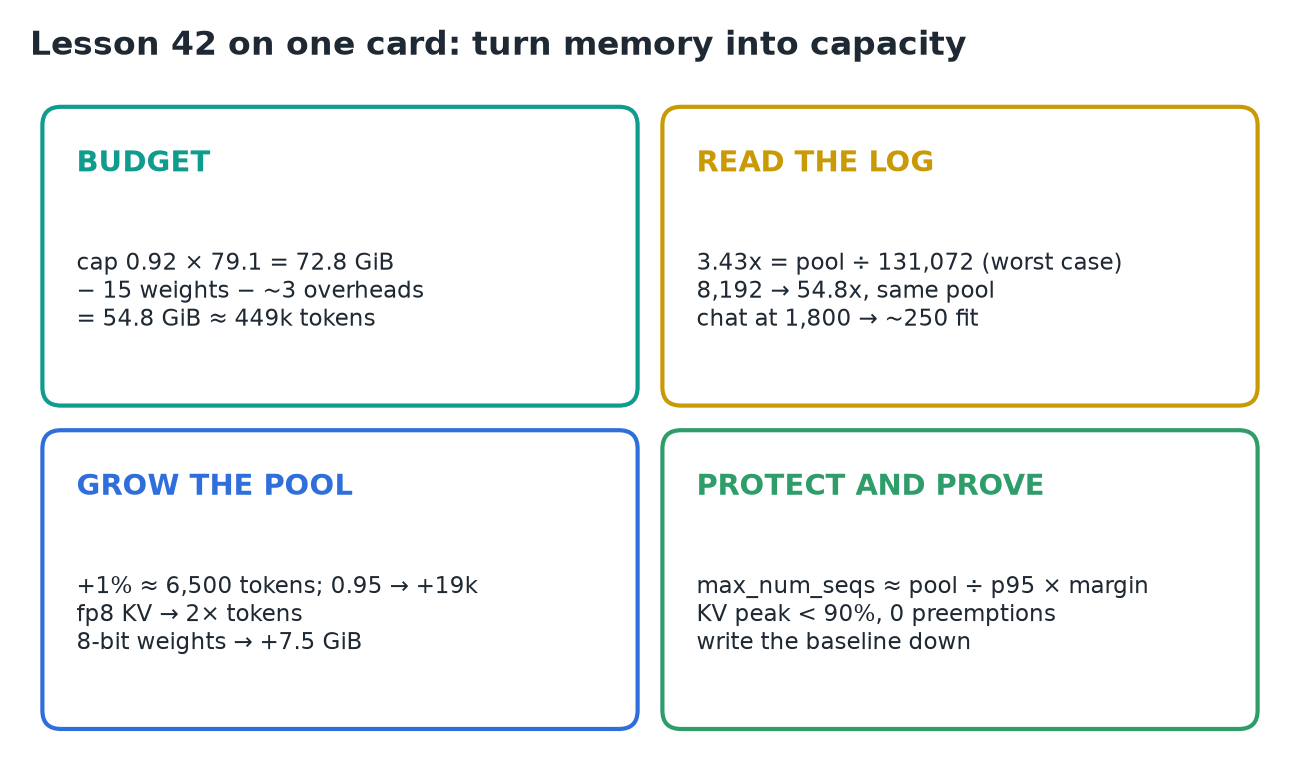
vLLM gives the KV cache whatever is left under the gpu_memory_utilization cap after weights, overheads and CUDA graphs: for Llama 3.1 8B on an H100 that's 54.8 GiB ≈ 449k tokens. The log's "maximum concurrency 3.43x" is just that pool ÷ max_model_len (131,072), a worst case, not a user limit: a 1,800-token chat only takes 1,800 tokens, so ~250 fit. Grow the pool with a careful cap (+1% ≈ 6,500 tokens) and fewer bytes (fp8 KV doubles it); protect it with a sensible max_model_len and a max_num_seqs sized from real shapes; then prove it under load: KV peak below ~90% and zero preemptions.
1. Where every gibibyte goes
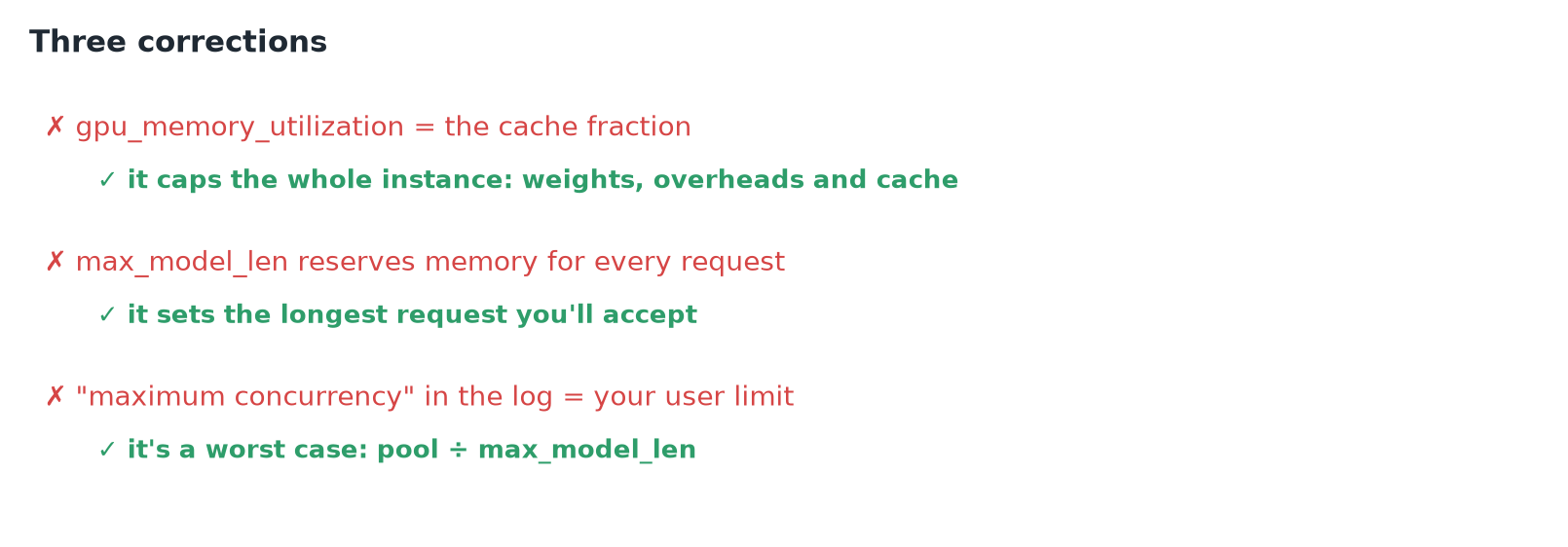
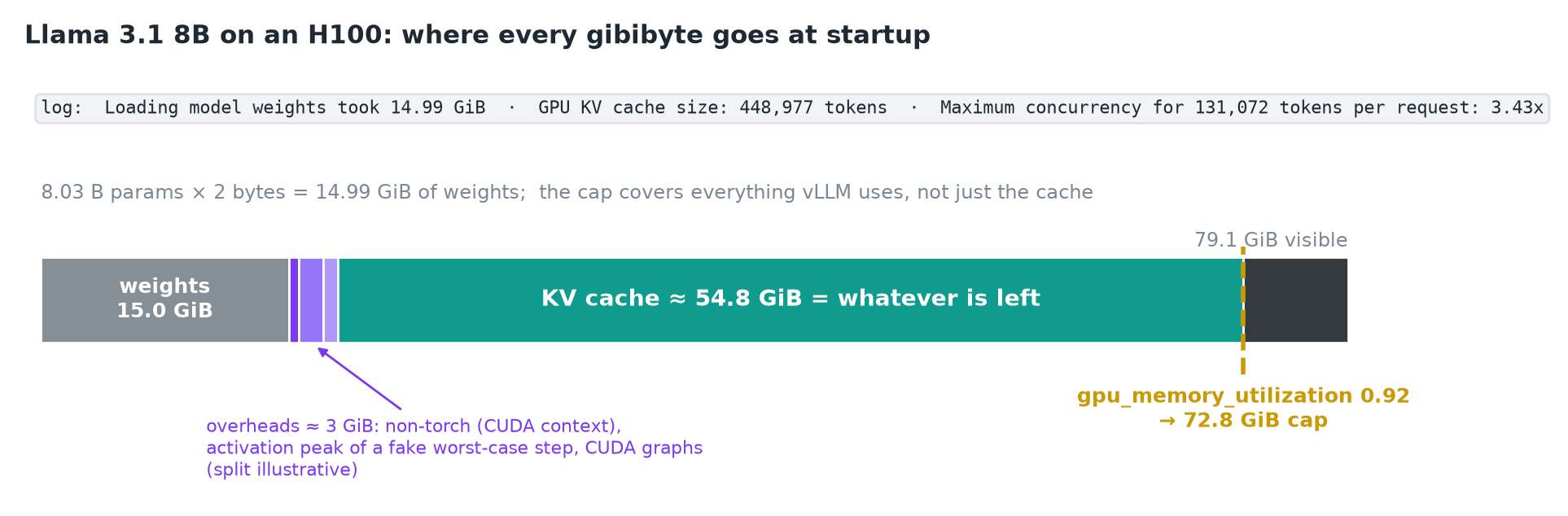 The cap covers the whole instance. The cache is the remainder, not a fraction you set.
- vLLM sees 79.1 GiB on this card.
gpu_memory_utilizationdefaults to 0.92, so the instance allows itself 72.8 GiB. - Weights: 8.03 B params × 2 bytes ≈ 15 GiB.
- Overheads ≈ 3 GiB: memory outside PyTorch (the CUDA context), the activation peak from a fake worst-case step (the biggest batch it may schedule), and CUDA graphs, the pre-recorded kernel launches that make decode fast.
- KV cache = what's left: 72.8 − 15 − 3 ≈ 54.8 GiB.
2. From gibibytes to tokens, and what "3.43x" means
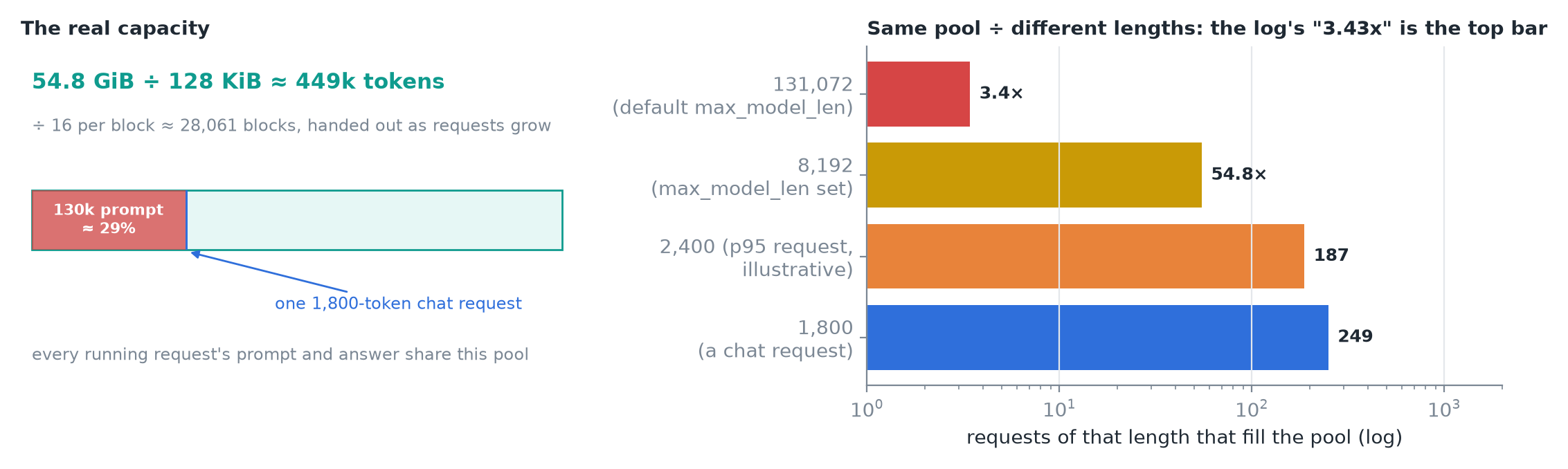 The pool is the real capacity; "maximum concurrency" divides it by the longest request you said you'd accept.
- 3.43x = 449k ÷ 131,072, Llama 3.1's default
max_model_len: three max-length requests would fill the cache. It says nothing about your actual users; blocks are handed out as requests grow, so an 1,800-token chat takes 1,800 tokens.
Why set max_model_len at all? Two reasons:
- Startup check: at least one request of that length must fit, or vLLM refuses to start and tells you the longest length that would.
- A promise to accept giant requests: one 130k-token prompt would take ~29% of the whole pool by itself.
- If the product never needs more than 8k tokens, set
--max-model-len 8192: the log now says 54.8x. The pool didn't change; your worst case did.
3. Knob 1: the utilization cap
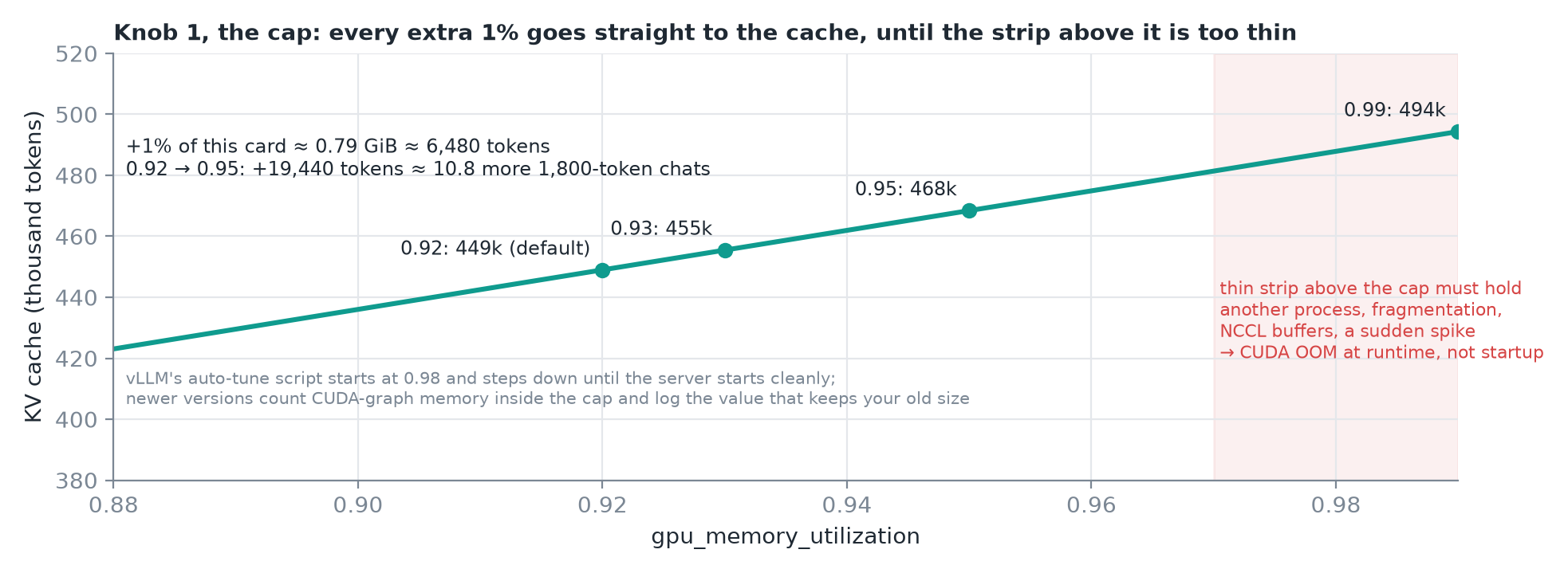 Points at 0.92, 0.93 and 0.95 match the lesson. The video's 0.99 frame shows ≈ 491k; the same budget gives ≈ 494k.
- Every 1% of this card ≈ 0.79 GiB ≈ 6,500 tokens. Raising 0.92 → 0.95 gains ~19,000 tokens, roughly 10 more chat requests.
- The catch is the strip above the cap: vLLM only controls what it allocates itself. Another process, fragmentation, NCCL communication buffers or a sudden spike must all fit there. If they don't: CUDA out of memory at runtime, not at startup, which is much worse.
- vLLM's auto-tuning script starts at 0.98 and steps down until the server starts cleanly.
- Newer versions count CUDA-graph memory inside the budget, and the log tells you which utilization value gives the same cache size as before.
4. Knob 2: fewer bytes per thing
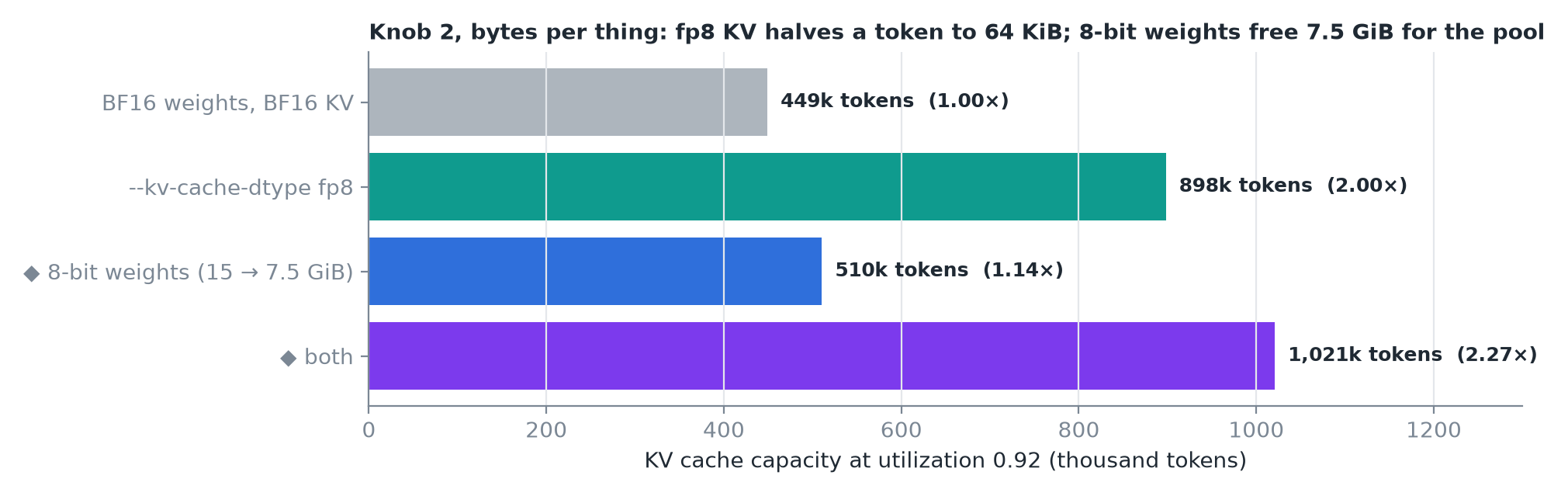 ◆ The 8-bit-weights and combined bars are my arithmetic: freed weight memory goes straight to the pool.
--kv-cache-dtype fp8: each token takes 64 KiB instead of 128, so the same 54.8 GiB holds ~900k tokens: twice the capacity from one flag.- 8-bit weights: 15 → 7.5 GiB, and the freed space goes straight into the pool.
CAUTION
Neither is free: both change the numbers the model computes with, so measure quality before you ship them.
5. Knob 3: how many requests you let in
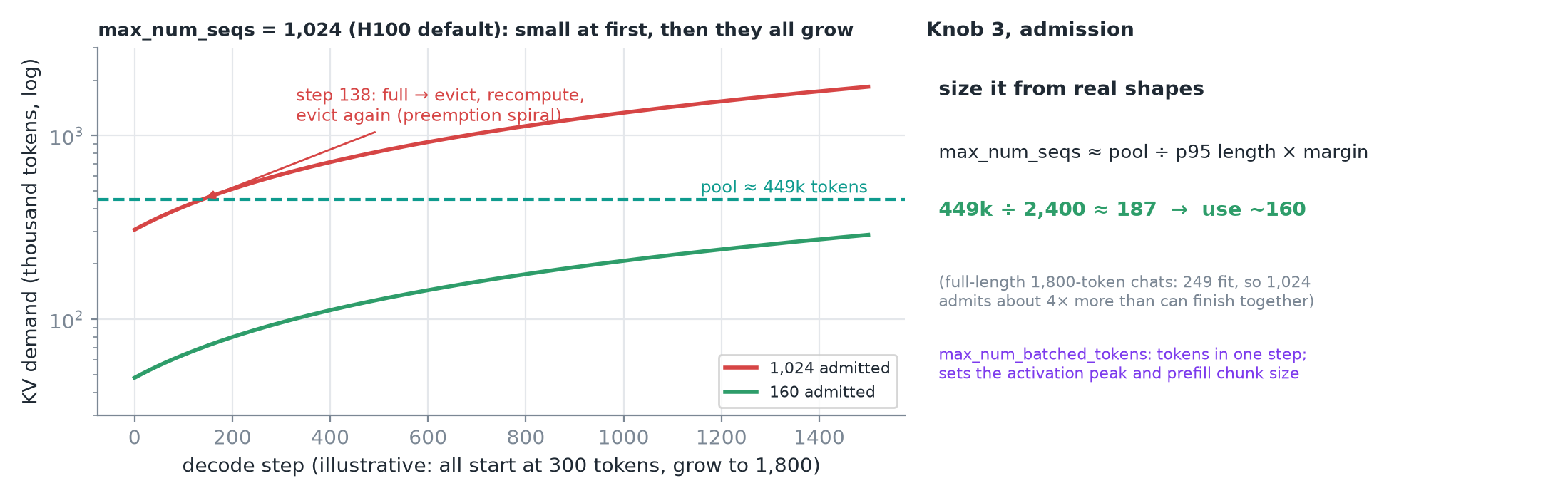 Left (illustrative shapes): 1,024 requests fit while they're small, then all grow by a token per step until the pool runs out.
max_num_seqsis the most requests the scheduler runs at once; the H100 server default is 1,024.- The pool holds ~250 chat requests at full length, so the default admits 4× more than can ever finish together → the pool fills, requests get evicted and recomputed: a preemption spiral.
- Size it from real shapes: pool ÷ a high-percentile request length (not the average) × a margin. Example: 449k ÷ 2,400 (p95) ≈ 187 → use ~160.
max_num_batched_tokensis the other admission knob: it caps the tokens in one step, which sets the activation peak measured at startup and the prefill chunk size.
6. Prove it under load
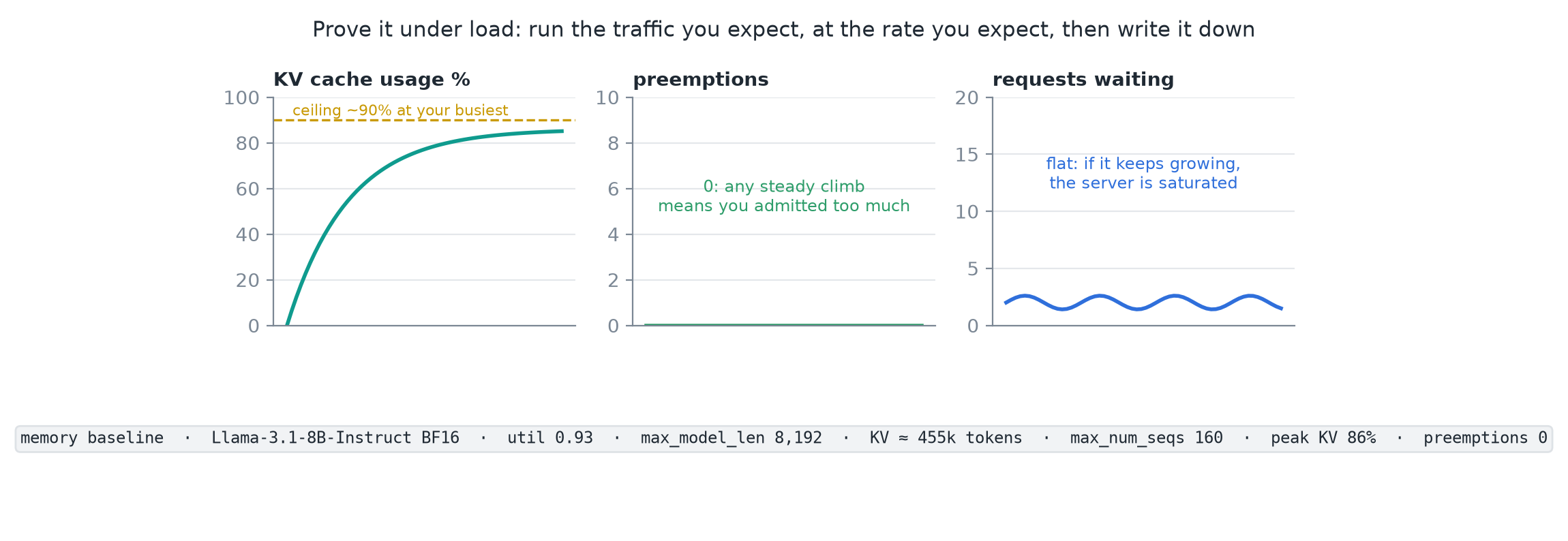 Run the traffic you expect, at the rate you expect, and record the result as your memory baseline.
| Watch | Healthy | If not |
|---|---|---|
| KV cache usage | Peaks comfortably below full, ~90% at your busiest | Little headroom for spikes |
| Preemptions | 0 at planned load | A steady climb: you admitted more than fits |
| Requests waiting | Flat | Keeps growing: the server is saturated, memory isn't the only problem |
- Preempting? Give the cache more memory (utilization, fp8, more GPUs) or admit fewer requests at once.
- Write down the settings and the capacity: that's the memory baseline for everything that follows.
7. Recap