25 · Sweep Concurrency & Request Rate
Source: fanout.sh / inference-eng / 05-02 · ~9 min
NOTE
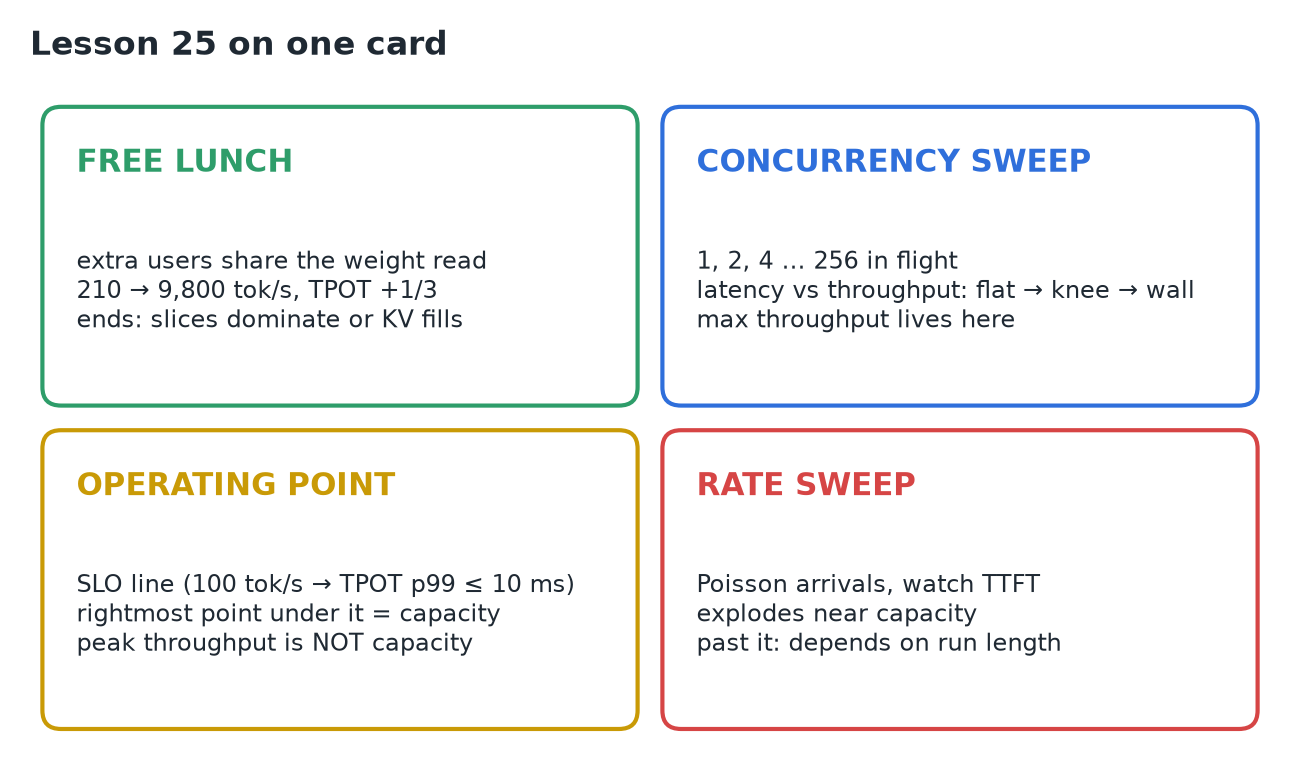
Batching is nearly free at first: extra users ride a weight read that happens anyway (illustrative: 1 user at 4.8 ms/step → 64 users at 6.5 ms gives ~47× throughput for +1/3 TPOT; Databricks measured 14× on one A100). It ends when per-user costs dominate or the KV cache fills. A concurrency sweep (1, 2, 4 … 256 in flight) draws the latency-throughput curve: flat → knee → wall, and your SLO line picks the operating point (the rightmost dot under it). A request-rate sweep with random arrivals shows TTFT exploding near capacity and, past it, growing for as long as you run. Peak throughput is not capacity: capacity is the most load that still meets the targets.
1. The free lunch
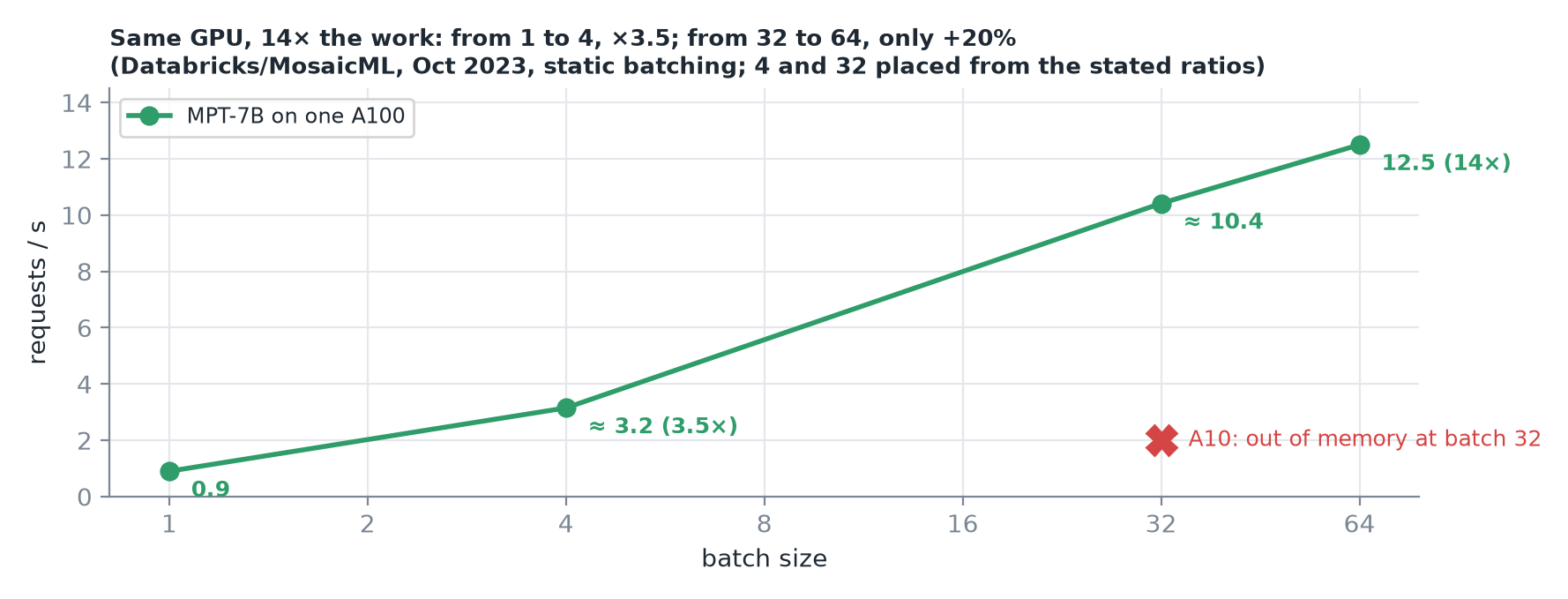 In 2023 MosaicML at Databricks served MPT-7B on one A100: 0.9 req/s one at a time, 12.5 req/s at batch 64. On a smaller A10 the climb stopped at batch 32: out of memory.
Start from the single-request baseline: one user on the H100, each decode step ≈ 4.8 ms, almost all of it reading weights. Add a second user: the step still reads the weights once, and that one read now makes two tokens. The extra user only adds their own keys and values to read, plus a little arithmetic.
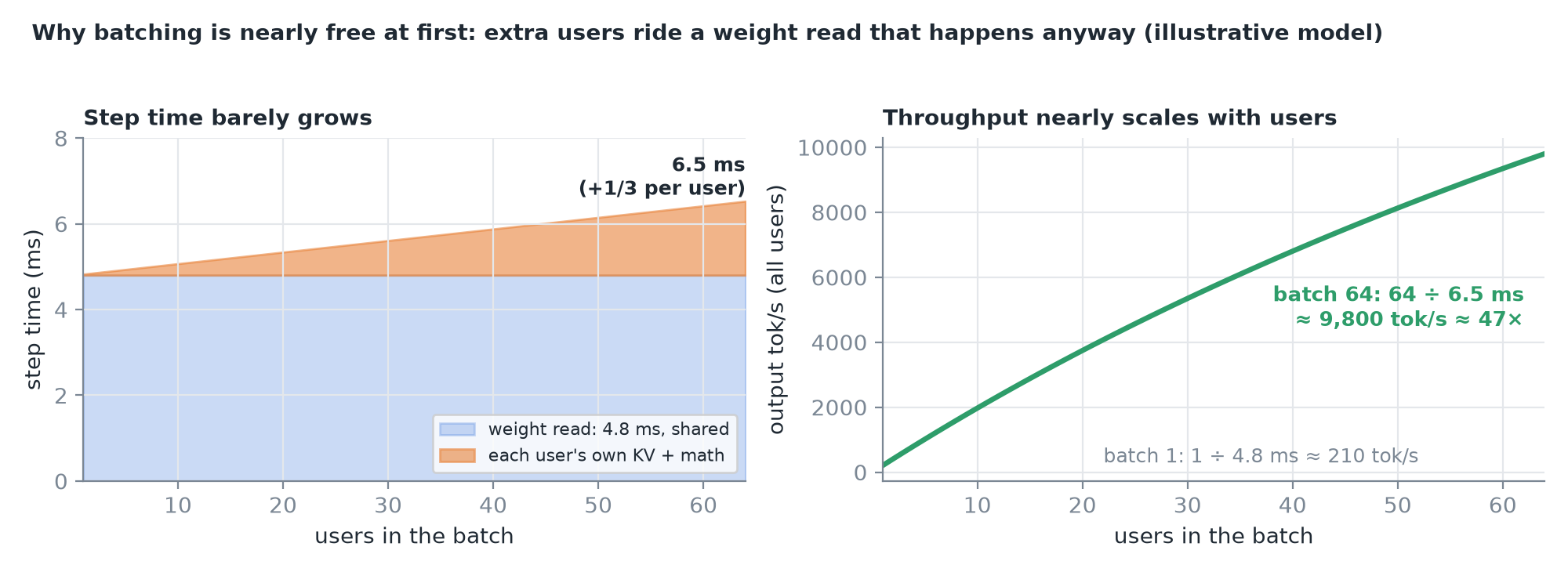 Illustrative model: 4.8 ms plus a small slice per user. At 64 users a step takes ~6.5 ms: each user's TPOT rises by a third, but the GPU makes 64 tokens per step instead of one.
It ends in two ways: the per-user slices add up until they dominate the step, or the KV cache fills GPU memory and new users have to wait.
2. Sweep 1: fixed concurrency
Keep exactly N requests in flight; when one finishes, the next starts. Run N = 1, 2, 4, 8 … doubling up to 256 or until something breaks. At each level record total output throughput and the median and P99 of TPOT and TTFT.
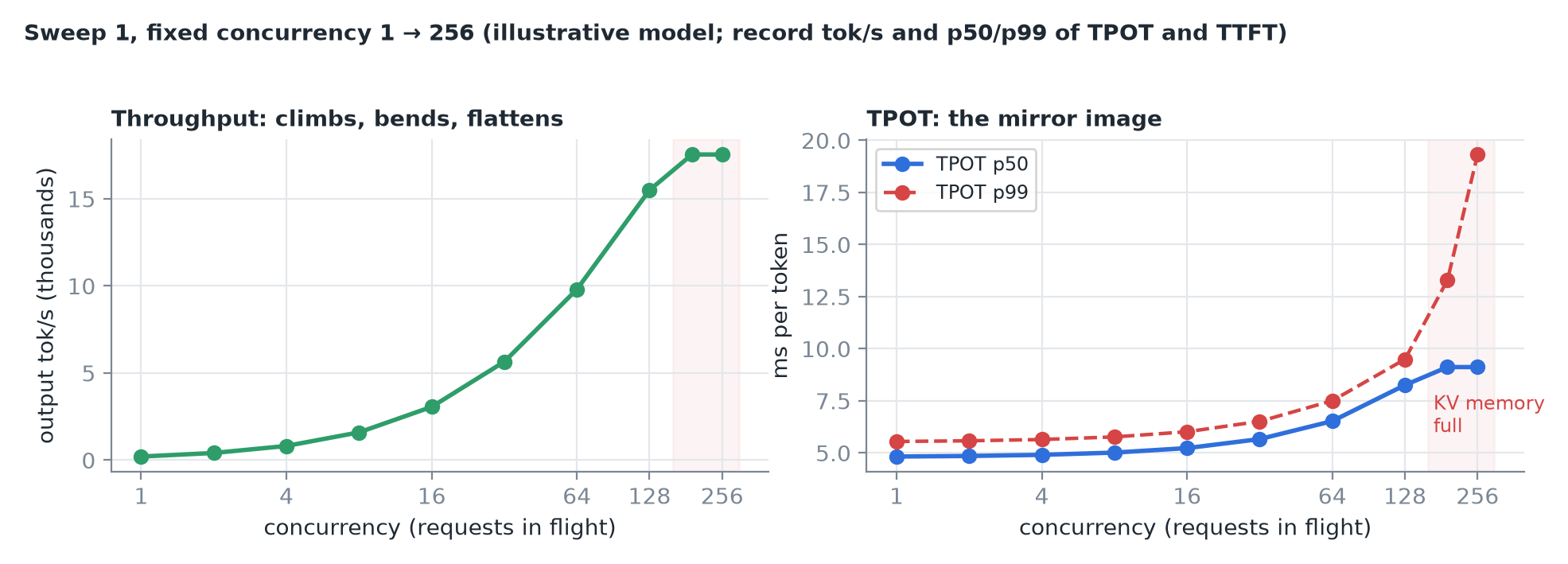 Throughput climbs steeply, bends, flattens; TPOT is the mirror image. Databricks saw the same shape: 1 → 4 users gave 3.5× the throughput, 32 → 64 only about 20% more.
3. The one plot that matters
Put throughput on the x-axis and TPOT on the y-axis, one dot per concurrency level, and read left to right.
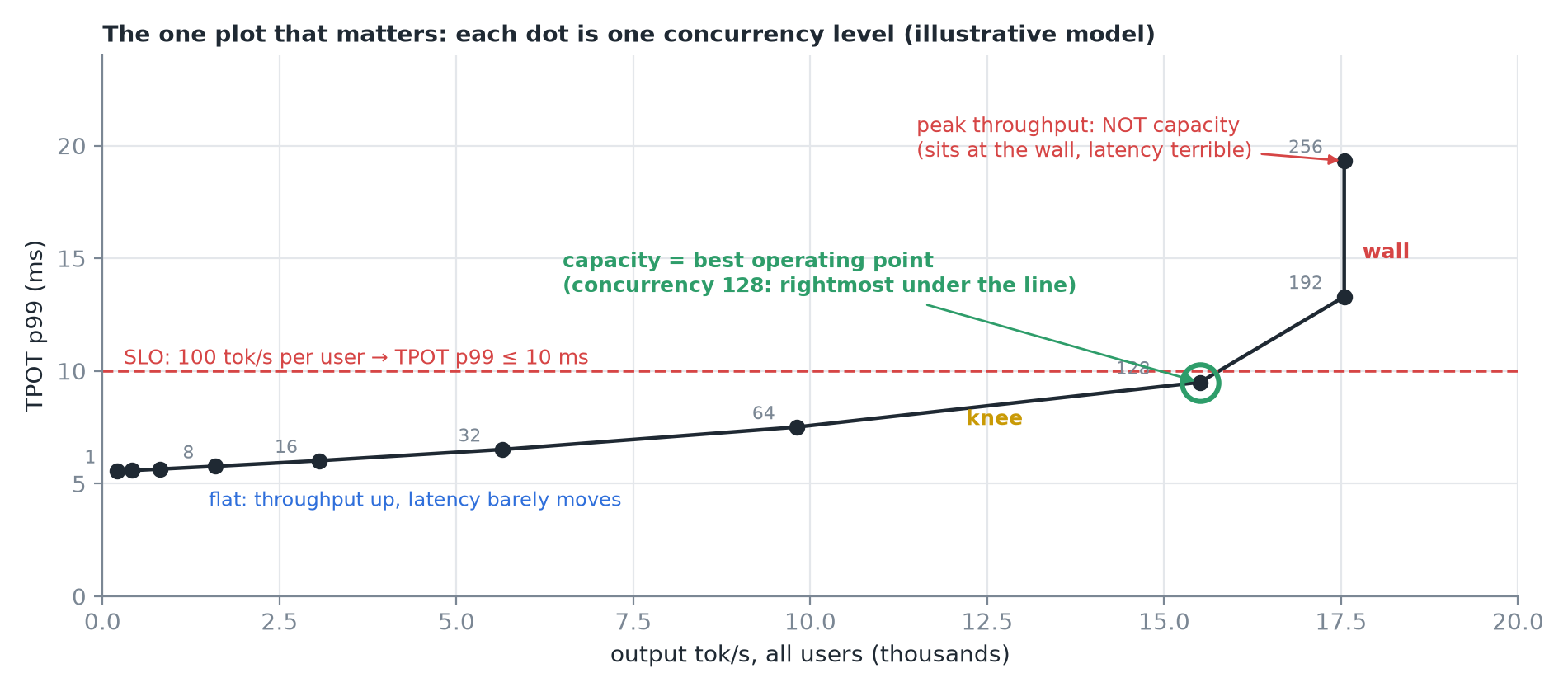
| Region | What happens |
|---|---|
| Flat | Throughput grows a lot, latency barely moves. You should almost always be at least this far along |
| Knee | Each extra user still adds throughput, but costs every other user a noticeable slowdown |
| Wall | Throughput stops growing; latency keeps climbing as requests wait for memory or a slot |
IMPORTANT
Your latency target picks the spot. If every user must see ≥ 100 tokens/s, that's TPOT ≤ 10 ms at P99: draw the line, and the best operating point is the rightmost dot still under it.
4. Sweep 2: fixed request rate
The concurrency sweep only sends a new request when an old one finishes, so it slows down when the server does. Real users arrive whenever they like. So the second sweep fixes the arrival rate (random arrivals averaging, say, 10/s) and raises it, watching TTFT.
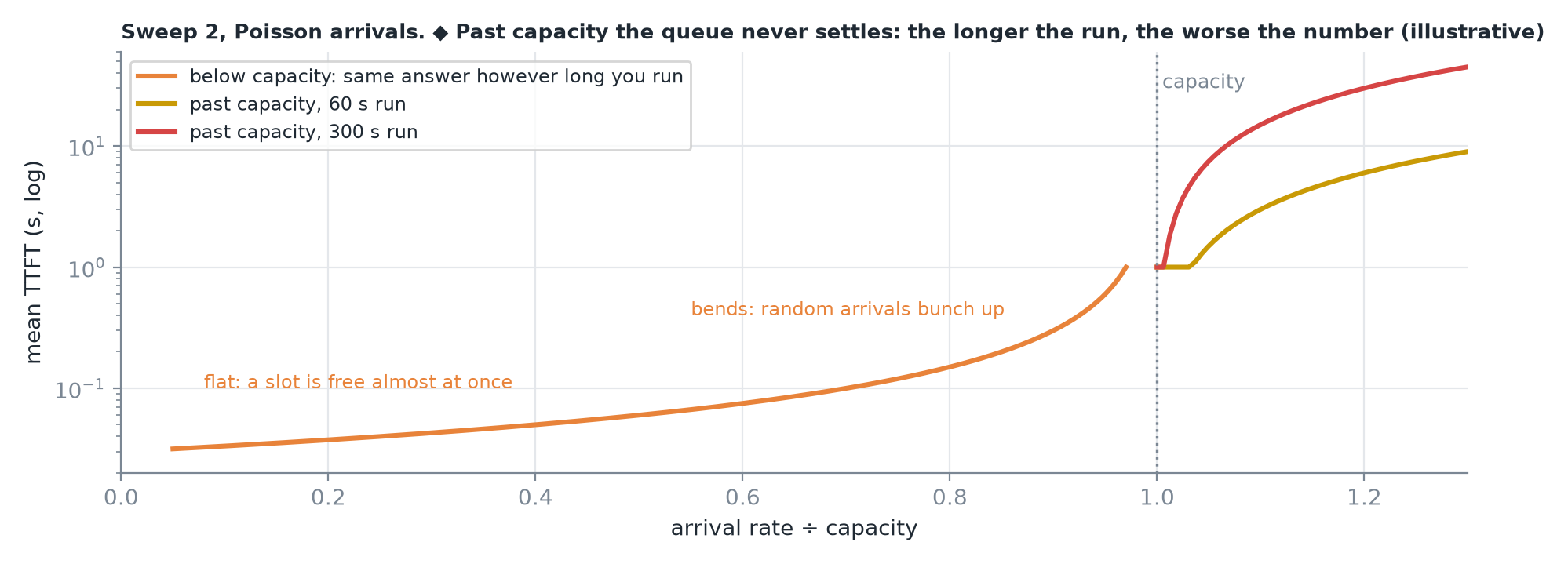 At low rates TTFT is flat: a slot is free almost at once. Near capacity it bends sharply as random arrivals bunch up. Past capacity the queue grows without limit.
TIP
If your result depends on how long you ran the benchmark, you're past capacity.
5. Running both with vLLM
vllm bench serve \
  --max-concurrency 32 \
  --request-rate 10 --burstiness 1 \
  --dataset-name random --random-input-len 512 \
  --random-output-len 256 --ignore-eos \
  --percentile-metrics ttft,tpot,e2el \
  --metric-percentiles 50,90,99 \
  --goodput ttft:500 tpot:10
--max-concurrency Nfor sweep 1;--request-ratewith--burstiness 1(Poisson-style) for sweep 2.- Fixed shape: random 512-token prompts, 256 output tokens, ignore EOS.
--goodputcounts requests that met your targets. vllm bench sweepruns a whole grid; GuideLLM has a sweep mode that finds the range automatically.
CAUTION
If you don't set a request rate it's infinite: every request is sent at time zero. That's one burst, not a steady rate.
6. How sweeps quietly go wrong
| Pitfall | Effect |
|---|---|
| Too few requests | At high rates a short run never reaches steady state: you measure the ramp-up |
| A weak client | The sender can't keep up: you benchmark the client. Compare achieved vs requested rate |
| Unrealistic prompts | Random prompts never share a prefix, so prefix caching never helps; real chat often does |
| Averages | The median looks fine while P99 has blown through the target |
CAUTION
The highest throughput on the curve is not your capacity: it sits at the wall, where latency is terrible. Capacity is the highest load that still meets the latency targets (goodput), always left of the peak.
7. Recap